The Problem
My internet kept dropping. Not for long — maybe 5 to 50 seconds at a time. But enough to break calls and SSH sessions. And because the drops were so short, they never showed up on a speed test.
My home network has three hops:
- Hop 1 — Laptop → Mesh Node
- Hop 2 — Mesh Node → Main Router
- Hop 3 — Main Router → ISP
I needed to know which hop was failing.
What I Built
A Python script that pings all three hops every couple of seconds and logs the results. When a drop happens, it checks which hops were still responding to work out where the failure was — Mesh, Router, or ISP. Everything goes into a local SQLite database. A small Flask dashboard shows the latency graph and the outage log.
That’s it. No more than what I needed.
The dashboard runs locally and shows:
- Real-time latency graph across all three hops
- Automated root cause label on each outage — Mesh, Router, or ISP
- 24-hour outage log with timestamps and duration
- Running totals: outage count and cumulative downtime
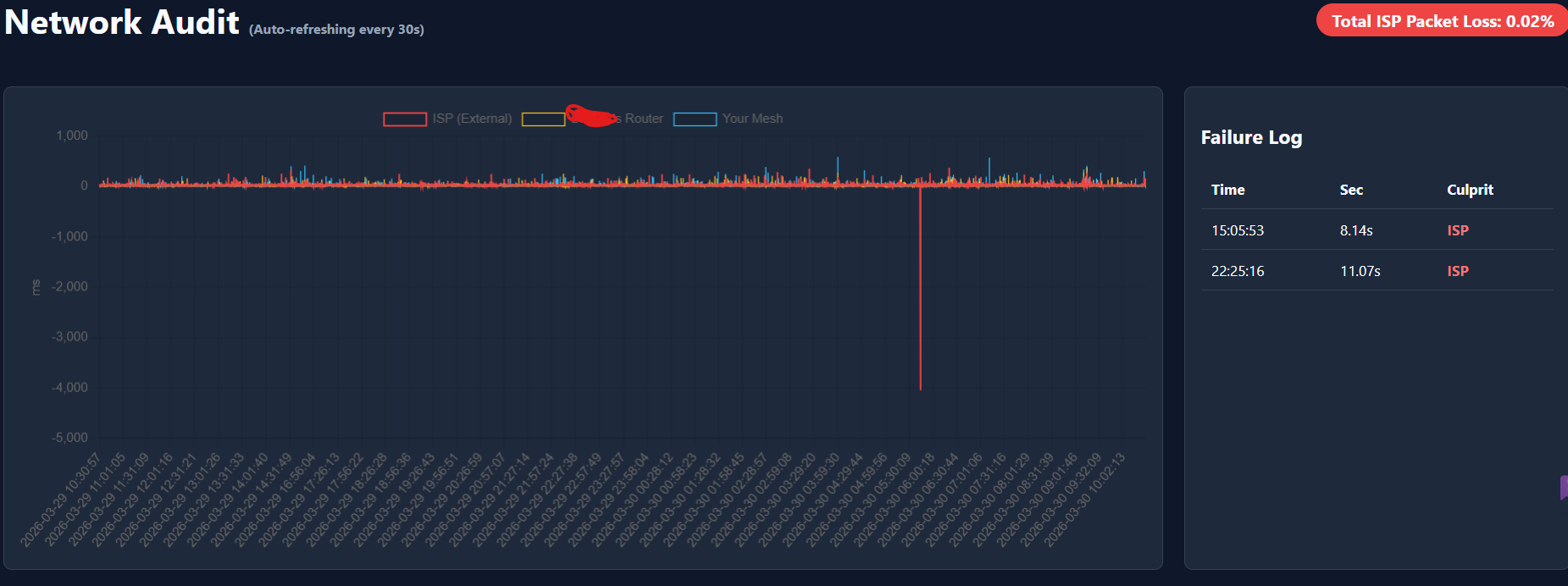
Live dashboard — two ISP-sourced outages in the 24h window. Total packet loss: 0.02%.
In my case both logged outages pointed to the ISP. The Mesh and Router stayed up both times. Good to know before picking up the phone.
How I Built It
I didn’t Google for an existing tool. I didn’t spend time on Stack Overflow. I described the setup to Gemini, the three hops, what should count as an outage and what I wanted to see on the dashboard. About 20 minutes later, I had working code.
I specified what each hop represented, what should count as an outage, what the dashboard needed to show. The AI handled the implementation. I handled the thinking about the problem.
I did the thinking about the problem. The barrier isn’t writing code anymore. The barrier is being clear about what you actually need.
The Bigger Point: Personal Software
We are entering an era of personal software. Everyone will have more custom tools, built specifically for their setup, their workflow, their exact problem — not a generic tool that almost fits.
This is what changes as AI coding gets better. The cost of building something specific drops so much that there’s no reason to settle for a generic tool that almost fits. You just describe what you need and build it.
In the past month alone, I’ve written more code than in the previous few years combined. Most of it I haven’t published anywhere. It’s just running in the background — automating things, tracking things, solving specific problems I had. About 10% of what I build ends up on GitHub. The rest is personal infrastructure.
The implication isn’t that software engineers disappear. It’s that software explodes. Far more of it, far more specific to each person’s situation, and far less of it ever gets sold as a product — because it doesn’t need to. It just needs to work for you.
Source code: github.com/manujguptain/NetworkOutageMonitor
Clone it, set your three IPs in the config block at the top, run python app.py and open localhost:5000.